¶ StarWind VSAN
If Ceph is too slow or you just need/have two servers, StarWind VSAN seems a good alternative. They have pretty good documentation on their website, like this guide on how to configure StarWind storage on Proxmox: https://www.starwindsoftware.com/resource-library/starwind-virtual-san-vsan-configuration-guide-for-proxmox-virtual-environment-ve-kvm-vsan-deployed-as-a-controller-virtual-machine-cvm-using-web-ui/. I had some difficulties understanding some parts, so this is a note-to-self on what I did to get it configured.
This exercise was done on Proxmox 9.1 with StarWind VSAN version V8 (build 20084, CVM Version 20251022).
¶ Setup
Currently I have 4 Proxmox nodes. 2 will be configured to have StarWind HA storage. The others will have different tasks. This does mean I have a quorate cluster without the need of a qDevice witness.
The StarWind enabled servers have a ConnectX-3 with virtual functions enabled. I passed one of them to the StarWind CVM for replication. My network setup required that I had Proxmox/Debian configure this VF with VLAN 80, as this cannot be configured in the StarWind VM.
ip link set enp23s0 vf 3 vlan 80
StarWind needs 2-3 network interfaces. I choose to use 3:
| VM nic | Traffic | Host nic | Speed | Vlan | Subnet |
|---|---|---|---|---|---|
| 1 | Heartbeat + Management | vmbr1 | 1 GbE | 10 | 10.33.10.0/24 |
| 2 | Data | vmbr0 | 10 GbE | 80 | 10.33.80.0/24 |
| 3 | Replication | VF 3 passthrough | 10 GbE | 80 | 172.31.80.0/24 |
Why this setup? The Proxmox host also has an IP address in the subnet of vlan 80. This allows it to access the Data (iSCSI) of StarWind directly through the Virtio NIC. Theoretically it should be faster, but I haven't tested it.
¶ StarWind config
Follow the guide.
¶ Proxmox host config
This is the same as the official documentation, but with some added notes.
-
Install multipath on both host:
apt install multipath-tools -
Edit initiator name on both host:
nano /etc/iscsi/initiatorname.iscsiI named mine
InitiatorName=iqn.1993-08.org.debian:jpl-proxmox1andInitiatorName=iqn.1993-08.org.debian:jpl-proxmox2. -
Edit
/etc/iscsi/iscsid.confnode.startup = automatic node.session.timeo.replacement_timeout = 15 node.session.scan = auto -
Create
/etc/multipath.confdevices{ device{ vendor "STARWIND" product "STARWIND*" path_grouping_policy multibus path_checker "tur" failback immediate path_selector "round-robin 0" rr_min_io 3 rr_weight uniform hardware_handler "1 alua" } } defaults { polling_interval 2 path_selector "round-robin 0" path_grouping_policy multibus uid_attribute ID_SERIAL rr_min_io 100 failback immediate user_friendly_names yes } -
Run iSCSI discovery on both nodes:
iscsiadm -m discovery -t st -p 10.33.80.21 iscsiadm -m discovery -t st -p 10.33.80.22 -
Connect iSCSI LUNs (I have two:
pvefor VM storage anddatafor data storage (goal Kubernetes/Docker)):iscsiadm -m node -T iqn.2008-08.com.starwindsoftware:10.33.10.21-pve -p 10.33.80.21 -l iscsiadm -m node -T iqn.2008-08.com.starwindsoftware:10.33.10.22-pve -p 10.33.80.22 -l iscsiadm -m node -T iqn.2008-08.com.starwindsoftware:10.33.10.21-data -p 10.33.80.21 -l iscsiadm -m node -T iqn.2008-08.com.starwindsoftware:10.33.10.22-data -p 10.33.80.22 -lIf you ever need to reconnect. First unlog:
iscsiadm -m node -T iqn.2008-08.com.starwindsoftware:10.33.10.21-pve -p 10.33.80.21 -u iscsiadm -m node -T iqn.2008-08.com.starwindsoftware:10.33.10.22-pve -p 10.33.80.22 -u iscsiadm -m node -T iqn.2008-08.com.starwindsoftware:10.33.10.21-data -p 10.33.80.21 -u iscsiadm -m node -T iqn.2008-08.com.starwindsoftware:10.33.10.22-data -p 10.33.80.22 -u -
Get WWID of StarWind HA device:
/lib/udev/scsi_id -g -u -d /dev/sdc -
The wwid must be added to the file ‘/etc/multipath/wwids’. To do this, run the following command with the appropriate wwid:
multipath -a %WWID% systemctl restart multipathd.service -
Check if multipathing is running correctly:
multipath -ll -
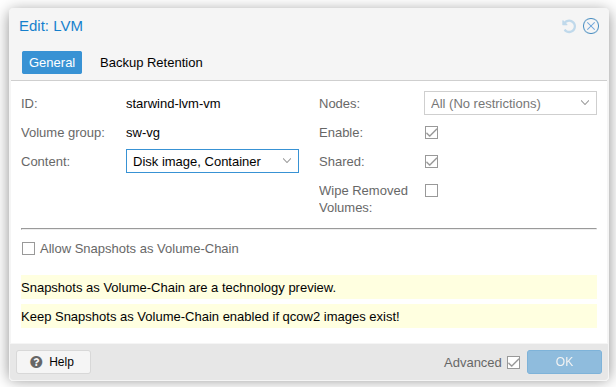
Add storage to Proxmox. StarWind offers a Proxmox plugin, but that didn't work on my machine. So I created an LVM volume and used the standard LVM storage option from Proxmox.
pvcreate /dev/mapper/mpatha
vgcreate sw-vg /dev/mapper/mpatha
pvcreate /dev/mapper/mpathb
vgcreate data-vg /dev/mapper/mpathb