¶ Mellanox
¶ ConnectX-3
The ConnectX-3 series is officially EOL. This means no driver and tooling updates. If you want or need to change anything in the firmware or update it, you need an older operating system or build the tooling yourself.
¶ Debian 13 (Proxmox 9)
This is the first thing I tried. What I learned: "don't bother". It is too much of a hassle. I ended up installing Ubuntu 20.04 on a small Dell Optiplex 5050 and doing the firmware changes on there.
However, for documentation purposes, here is how to do it on Debian 13.
The mstflint version shipped with Debian 13 doesn't support the ConnectX-3. You have to build an older version, 4.26.0 seems to be the last one to support it. At least I thought, this says 4.25.0: https://github.com/Mellanox/mstflint/issues/590.
apt install automake build-essential libtool libibmad-dev libssl-dev zlib1g-dev
wget https://github.com/Mellanox/mstflint/releases/download/v4.26.0-1/mstflint-4.26.0-1.tar.gz
tar -zxvf mstflint-4.26.0-1.tar.gz
cd mstflint-4.26.0/
./autogen.sh
mkdir build
cd build
../configure
make -j8
make install
¶ Update firmware
I actually have the HP546SFP+ branded version. The firmware can be downloaded from support.hpe.com. An awful website to find something and this link might stop working in the future. Anyway, version 1.0.20(B) seems to be the last one with support for ConnectX-3.
-
First get the device id (in my case
17:00.0):lspci | grep -i mellanoxroot@jpl-proxmox1:~# lspci | grep Mellanox 17:00.0 Ethernet controller: Mellanox Technologies MT27520 Family [ConnectX-3 Pro] -
Query the card to verify
mstflintworks:mstflint -d 17:00.0 q -
Update firmware:
apt install rpm2cpio cpio wget https://downloads.hpe.com/pub/softlib2/software1/sc-linux-fw/p1182272498/v248611/firmware-nic-mellanox-ethernet-only-1.0.20-3.1.x86_64.rpm rpm2cpio firmware-nic-mellanox-ethernet-only-1.0.20-3.1.x86_64.rpm | cpio -idmv mstflint -d 17:00.0 -i ./usr/lib/x86_64-linux-gnu/firmware-nic-mellanox-ethernet-only-1.0.20-3.1/nic-fw/fw-ConnectX3Pro-full-rel-2_42_5044-779793-B21_0A-CLP-8025-UEFI-14.11.48-FlexBoot-3.4.754.bin burn -
Reboot the machine
reboot
It is possible to flash a HP branded card to generic Mellanox. Get the firmware from Mellanox/Nvidia and use the
--allow_psid_changeflag. When I did that the MAC addresses were cleared and the card didn't work. Haven't tried again as the HP firmware is fine.
¶ Enable SR-IOV
SR-IOV and virtual functions need to be enabled in the firmware of the card AND in the driver in the OS. If you try to enable the firmware on a "too modern" OS, you probably get -E- Unsupported device. This is because the ConnectX-3 is EOL and not supperted by the mstflint version supplied with the OS. Either build a compatible version of mstflint yourself as explained above or enable SR-IOV on the firmware level using an older OS (Debian 12 or Ubuntu 20.04 seem to work with ConnectX-3). Then reinstall the card in your host and continue with enabling the drivers.
-
Check that SR-IOV is enabled in the BIOS of your host (and firmware update machine, see above). The images below show the screens in the Lenovo P520 bios.
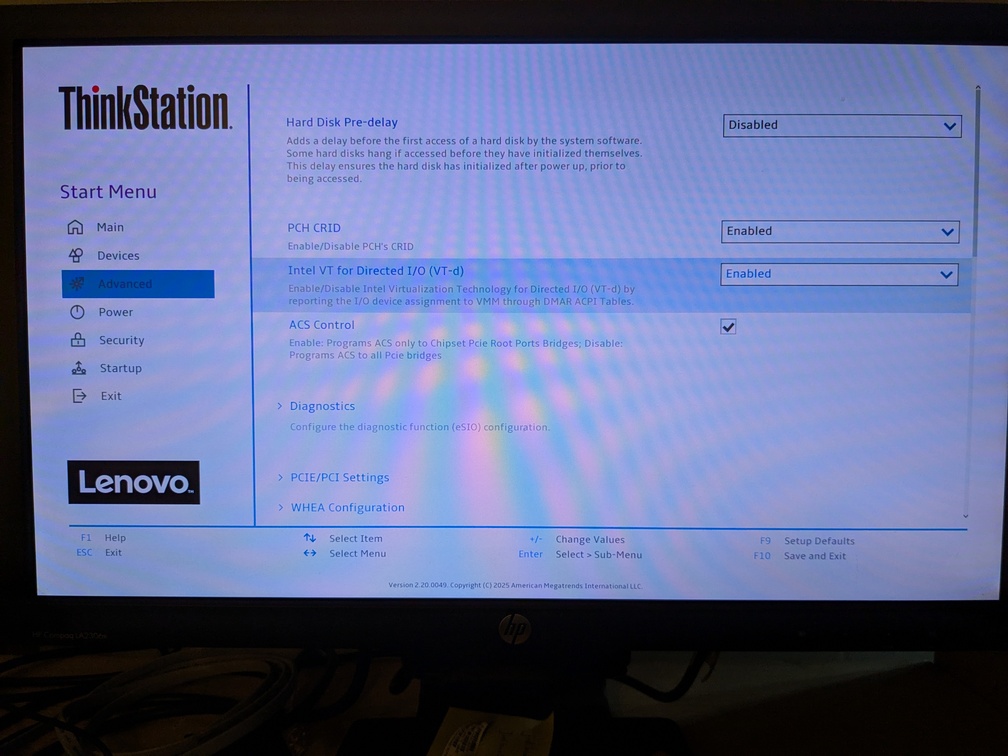
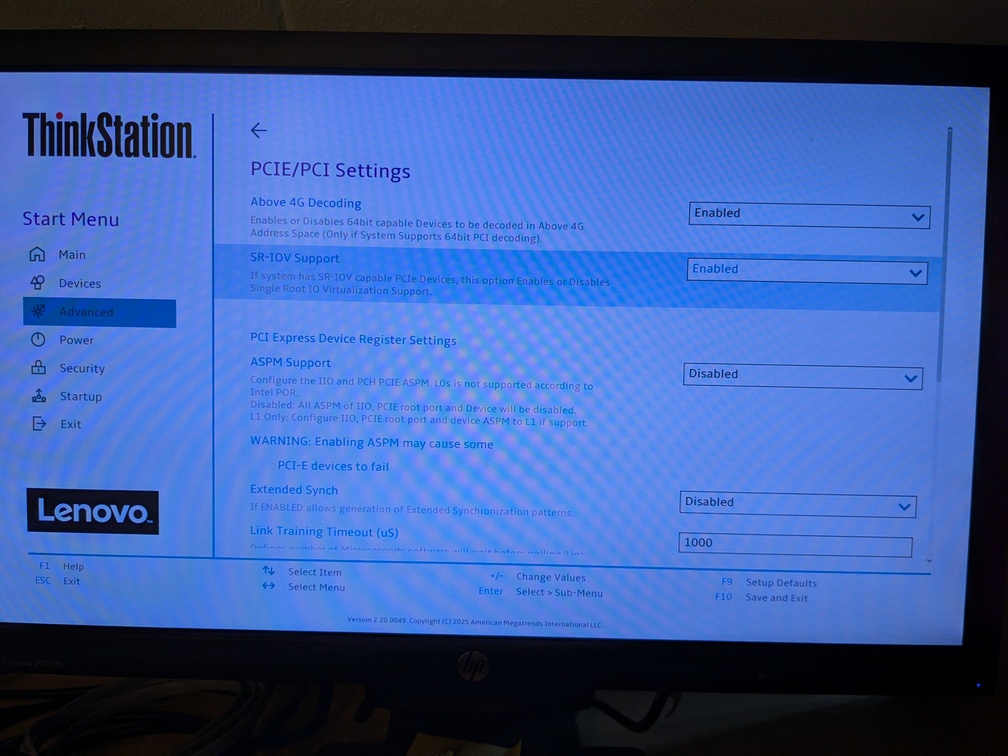
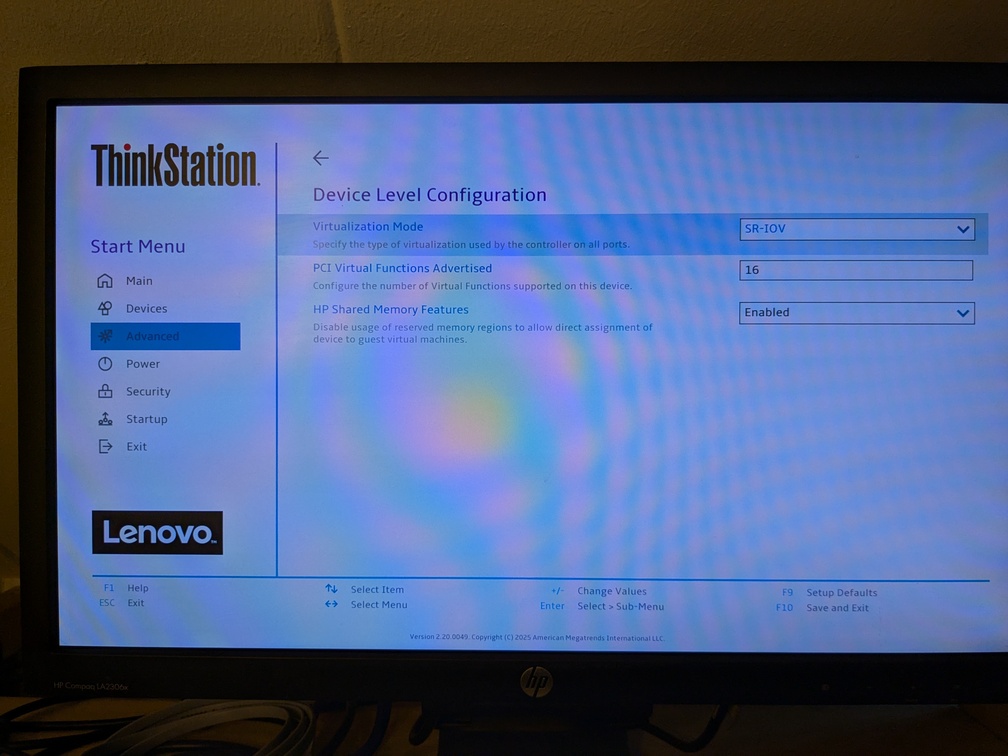
-
As seen in the third image, my card already had SR-IOV and all virtual functions enabled. So the command is not tested.
mstconfig -d 17:00.0 set SRIOV_EN=1 NUM_OF_VFS=16 -
Reboot the machine
-
Now tell the drivers to load the virtual functions. This can be less than the amount available in the firmware.
Create driver config:nano /etc/modprobe.d/mlx4_core.confAdd lines:
options mlx4_core num_vfs=2,2,0 probe_vf=2,2,0 port_type_array=2,2 options mlx4_core enable_sys_tune=1 options mlx4_en inline_thold=0 options mlx4_core log_num_mgm_entry_size=-7Reload driver:
modprobe -r mlx4_en mlx4_ib modprobe mlx4_en update-initramfs -u -k allExplanation:
options mlx4_core num_vfs=4,4,0 probe_vf=2,2,0 port_type_array=2,2- Creates 4 VFs on each of the two physical ports.
- Exposes only 2 VFs per port as network interfaces in the host.
- The remaining 2 VFs per port can be passed through directly to VMs without host interface creation
-
Check that all virtual functions are available in the host:
lspci | grep MellanoxThe first VFs are linked to port 1, the last to port 2. In this case
.1and.2on port 1,.3and.4on port 2.root@jpl-proxmox1:~# lspci | grep Mellanox 17:00.0 Ethernet controller: Mellanox Technologies MT27520 Family [ConnectX-3 Pro] 17:00.1 Ethernet controller: Mellanox Technologies MT27500/MT27520 Family [ConnectX-3/ConnectX-3 Pro Virtual Function] 17:00.2 Ethernet controller: Mellanox Technologies MT27500/MT27520 Family [ConnectX-3/ConnectX-3 Pro Virtual Function] 17:00.3 Ethernet controller: Mellanox Technologies MT27500/MT27520 Family [ConnectX-3/ConnectX-3 Pro Virtual Function] 17:00.4 Ethernet controller: Mellanox Technologies MT27500/MT27520 Family [ConnectX-3/ConnectX-3 Pro Virtual Function]
¶ ConnectX-4
I bought Dell branded cards. Model number: CX4121C, part number: 020NJD. These are Dell branded Mellanox CX4121A-ACAT cards.
To work with my Mikrotik switch I have to manually set the speed and forward error correction (FEC) modes. This is not possible with the Dell firmware. Luckily these cards can be flashed to standard Mellanox firmware.
¶ Get tools
-
Download Nvidia/Mellanox tools. Find the latest version here: https://network.nvidia.com/products/adapter-software/firmware-tools/. In my case it was
4.35.0-159.wget https://network.nvidia.com/downloads/MFT/mft-4.35.0-159-x86_64-deb.tgz -
Extract and install:
tar -xzf mft-*.tgz cd mft-* ./install.sh -
Start
mst:mst start
¶ Query cards
-
Check
mst:mst statusThis returns the device and bus:
MST modules: ------------ MST PCI module is not loaded MST PCI configuration module loaded MST devices: ------------ /dev/mst/mt4117_pciconf0 - PCI configuration cycles access. domain:bus:dev.fn=0000:0a:00.0 addr.reg=88 data.reg=92 cr_bar.gw_offset=-1 Chip revision is: 00 -
Download the current device info:
flint -d 0000:0a:00.0 qOutput:
Image type:            FS3
FW Version:            14.27.6122
FW Release Date:       12.8.2020
Product Version:       14.27.6122
Rom Info:              type=UEFI version=14.20.27 cpu=AMD64
                       type=PXE version=3.5.903 cpu=AMD64
Description:           UID                GuidsNumber
Base GUID:             043f720300f7cd9a        8
Base MAC:              043f72f7cd9a            8
Image VSD:             N/A
Device VSD:            N/A
PSID:                  DEL2420110034
Security Attributes:   N/A
¶ Flash cards
-
Download latest firmware here: https://network.nvidia.com/support/firmware/connectx4lxen/. In my case:
14.32.1912.wget https://www.mellanox.com/downloads/firmware/fw-ConnectX4Lx-rel-14_32_1912-MCX4121A-ACA_Ax-UEFI-14.25.17-FlexBoot-3.6.502.bin.zip -
Extract:
unzip fw-ConnectX4Lx-rel-14_32_1912-MCX4121A-ACA_Ax-UEFI-14.25.17-FlexBoot-3.6.502.bin.zip -
Flash firmware:
flint -d 0000:0a:00.0 -i fw-ConnectX4Lx-rel-14_32_1912-MCX4121A-ACA_Ax-UEFI-14.25.17-FlexBoot-3.6.502.bin -allow_psid_change burnOutput:
Done. Current FW version on flash: 14.27.6122 New FW version: 14.32.1912 You are about to replace current PSID on flash - "DEL2420110034" with a different PSID - "MT_2420110034". Note: It is highly recommended not to change the PSID. Do you want to continue ? (y/n) [n] : y Burning FW image without signatures - OK Restoring signature - OK -I- To load new FW, issue system-level reset or use mlxfwreset where applicable. -
Reset the card:
mlxfwreset --device 0000:0a:00.0 --level 3 --type 0 reset -
Check device info:
flint -d 0000:0a:00.0 qOutput:
Image type:            FS3
FW Version:            14.32.1912
FW Release Date:       21.1.2026
Product Version:       14.32.1912
Rom Info:              type=UEFI version=14.25.17 cpu=AMD64,AARCH64
                       type=PXE version=3.6.502 cpu=AMD64
Description:           UID                GuidsNumber
Base GUID:             043f720300f7cd9a        8
Base MAC:              043f72f7cd9a            8
Image VSD:             N/A
Device VSD:            N/A
PSID:                  MT_2420110034
Security Attributes:   N/A
If you ever want to go back to OEM: https://network.nvidia.com/support/oem-firmware-downloads/. These are old versions, but I couldn't find the latest one on the Dell site.
¶ Configure cards
-
Set fec mode to
0x2: MODE_2 - disabled DME, RS FEC for 25G/50G/100G:mstconfig -d 0000:0a:00.0 set PHY_FEC_OVERRIDE_P1=MODE_2 mstconfig -d 0000:0a:00.0 set PHY_FEC_OVERRIDE_P2=MODE_2 -
Set
AUTO_POWER_SAVE_LINK_DOWN_P1to true:mstconfig -d 0000:0a:00.0 set AUTO_POWER_SAVE_LINK_DOWN_P1=1 mstconfig -d 0000:0a:00.0 set AUTO_POWER_SAVE_LINK_DOWN_P2=1 -
Enable SRIOV and set the amount of virtual functions (8):
mstconfig -d 0000:0a:00.0 set SRIOV_EN=1 mstconfig -d 0000:0a:00.0 set NUM_OF_VFS=8 -
Reboot
-
Create a systemd unit
mlx5-sriov.service:nano /etc/systemd/system/mlx5-sriov.serviceContent:
[Unit] Description=Enable SR-IOV VFs for ConnectX-4 Lx After=systemd-modules-load.service After=sys-subsystem-pci-devices-0000:0a:00.0.device After=sys-subsystem-pci-devices-0000:0a:00.1.device Requires=sys-subsystem-pci-devices-0000:0a:00.0.device Requires=sys-subsystem-pci-devices-0000:0a:00.1.device Before=network.target [Service] Type=oneshot ExecStart=/bin/sh -c 'echo 0 > /sys/bus/pci/devices/0000:0a:00.0/sriov_numvfs || true' ExecStart=/bin/sh -c 'echo 0 > /sys/bus/pci/devices/0000:0a:00.1/sriov_numvfs || true' ExecStart=/bin/sh -c 'echo 4 > /sys/bus/pci/devices/0000:0a:00.0/sriov_numvfs' ExecStart=/bin/sh -c 'echo 4 > /sys/bus/pci/devices/0000:0a:00.1/sriov_numvfs' RemainAfterExit=yes [Install] WantedBy=multi-user.target -
Enable and start:
systemctl daemon-reload systemctl enable mlx5-sriov.service systemctl start mlx5-sriov.service -
Check virtual functions:
lspci -nn | grep -i mellOutput:
0a:00.0 Ethernet controller [0200]: Mellanox Technologies MT27710 Family [ConnectX-4 Lx] [15b3:1015] 0a:00.1 Ethernet controller [0200]: Mellanox Technologies MT27710 Family [ConnectX-4 Lx] [15b3:1015] 0a:00.2 Ethernet controller [0200]: Mellanox Technologies MT27710 Family [ConnectX-4 Lx Virtual Function] [15b3:1016] 0a:00.3 Ethernet controller [0200]: Mellanox Technologies MT27710 Family [ConnectX-4 Lx Virtual Function] [15b3:1016] 0a:00.4 Ethernet controller [0200]: Mellanox Technologies MT27710 Family [ConnectX-4 Lx Virtual Function] [15b3:1016] 0a:00.5 Ethernet controller [0200]: Mellanox Technologies MT27710 Family [ConnectX-4 Lx Virtual Function] [15b3:1016] 0a:01.2 Ethernet controller [0200]: Mellanox Technologies MT27710 Family [ConnectX-4 Lx Virtual Function] [15b3:1016] 0a:01.3 Ethernet controller [0200]: Mellanox Technologies MT27710 Family [ConnectX-4 Lx Virtual Function] [15b3:1016] 0a:01.4 Ethernet controller [0200]: Mellanox Technologies MT27710 Family [ConnectX-4 Lx Virtual Function] [15b3:1016] 0a:01.5 Ethernet controller [0200]: Mellanox Technologies MT27710 Family [ConnectX-4 Lx Virtual Function] [15b3:1016] -
Check card configuration:
mstconfig -d 0000:0a:00.0 qOutput:
Device #1:
----------

Device type:        ConnectX4LX
Name:               MCX4121A-ACA_Ax
Description:        ConnectX-4 Lx EN network interface card; 25GbE dual-port SFP28; PCIe3.0 x8; ROHS R6
Device:             0000:0a:00.0

Configurations:                                          Next Boot
    FLEX_PARSER_PROFILE_ENABLE                  0
    FLEX_IPV4_OVER_VXLAN_PORT                   0
    SWITCH_COMPT_FEATURE_MASK                   0x0(0)
    PF_NUM_OF_VF_VALID                          False(0)
    NON_PREFETCHABLE_PF_BAR                     False(0)
    VF_VPD_ENABLE                               False(0)
    STRICT_VF_MSIX_NUM                          False(0)
    VF_NODNIC_ENABLE                            False(0)
    NUM_PF_MSIX_VALID                           True(1)
    NUM_OF_VFS                                  8
    NUM_OF_PF                                   2
    SRIOV_EN                                    True(1)
    PF_LOG_BAR_SIZE                             5
    VF_LOG_BAR_SIZE                             0
    NUM_PF_MSIX                                 63
    NUM_VF_MSIX                                 11
    PCIE_CREDIT_TOKEN_TIMEOUT                   0
    PCI_BUS0_RESTRICT_SPEED                     PCI_GEN_1(0)
    PCI_BUS0_RESTRICT_ASPM                      False(0)
    PCI_BUS0_RESTRICT_WIDTH                     PCI_X1(0)
    PCI_BUS0_RESTRICT                           False(0)
    PCI_DOWNSTREAM_PORT_OWNER                   Array[0..15]
    LOG_DCR_HASH_TABLE_SIZE                     14
    MAX_PACKET_LIFETIME                         0
    DCR_LIFO_SIZE                               16384
    MEMIC_BAR_SIZE                              0
    MEMIC_SIZE_LIMIT                            _256KB(1)
    ICM_CACHE_MODE                              DEVICE_DEFAULT(0)
    TX_SCHEDULER_BURST                          0
    ACCURATE_TX_SCHEDULER                       False(0)
    PARTIAL_RESET_EN                            False(0)
    SW_RECOVERY_ON_ERRORS                       False(0)
    RESET_WITH_HOST_ON_ERRORS                   False(0)
    ROCE_NEXT_PROTOCOL                          254
    LOG_MAX_QUEUE                               17
    CQE_COMPRESSION                             BALANCED(0)
    IP_OVER_VXLAN_EN                            False(0)
    MKEY_BY_NAME                                False(0)
    UCTX_EN                                     True(1)
    PCI_ATOMIC_MODE                             PCI_ATOMIC_DISABLED_EXT_ATOMIC_ENABLED(0)
    TUNNEL_ECN_COPY_DISABLE                     False(0)
    LRO_LOG_TIMEOUT0                            6
    LRO_LOG_TIMEOUT1                            7
    LRO_LOG_TIMEOUT2                            8
    LRO_LOG_TIMEOUT3                            13
    INT_LOG_MAX_PAYLOAD_SIZE                    AUTOMATIC(0)
    IB_PROTO_WIDTH_EN_MASK_P1                   0
    IB_PROTO_WIDTH_EN_MASK_P2                   0
    KEEP_ETH_LINK_UP_P1                         True(1)
    KEEP_IB_LINK_UP_P1                          False(0)
    KEEP_LINK_UP_ON_BOOT_P1                     False(0)
    KEEP_LINK_UP_ON_STANDBY_P1                  False(0)
    DO_NOT_CLEAR_PORT_STATS_P1                  False(0)
    AUTO_POWER_SAVE_LINK_DOWN_P1                True(1)
    KEEP_ETH_LINK_UP_P2                         True(1)
    KEEP_IB_LINK_UP_P2                          False(0)
    KEEP_LINK_UP_ON_BOOT_P2                     False(0)
    KEEP_LINK_UP_ON_STANDBY_P2                  False(0)
    DO_NOT_CLEAR_PORT_STATS_P2                  False(0)
    AUTO_POWER_SAVE_LINK_DOWN_P2                True(1)
    PHY_FEC_OVERRIDE_P1                         MODE_2(2)
    PHY_FEC_OVERRIDE_P2                         MODE_2(2)
    LLDP_NB_DCBX_P1                             False(0)
    LLDP_NB_RX_MODE_P1                          OFF(0)
    LLDP_NB_TX_MODE_P1                          OFF(0)
    LLDP_NB_DCBX_P2                             False(0)
    LLDP_NB_RX_MODE_P2                          OFF(0)
    LLDP_NB_TX_MODE_P2                          OFF(0)
    DCBX_IEEE_P1                                True(1)
    DCBX_CEE_P1                                 True(1)
    DCBX_WILLING_P1                             True(1)
    DCBX_IEEE_P2                                True(1)
    DCBX_CEE_P2                                 True(1)
    DCBX_WILLING_P2                             True(1)
    DUP_MAC_ACTION_P1                           LAST_CFG(0)
    SRIOV_IB_ROUTING_MODE_P1                    LID(1)
    IB_ROUTING_MODE_P1                          LID(1)
    DUP_MAC_ACTION_P2                           LAST_CFG(0)
    SRIOV_IB_ROUTING_MODE_P2                    LID(1)
    IB_ROUTING_MODE_P2                          LID(1)
    NUM_OF_PLANES_P1                            0
    NUM_OF_PLANES_P2                            0
    NUM_OF_VL_P1                                _4_VLs(3)
    NUM_OF_TC_P1                                _8_TCs(0)
    NUM_OF_PFC_P1                               8
    VL15_BUFFER_SIZE_P1                         0
    NUM_OF_VL_P2                                _4_VLs(3)
    NUM_OF_TC_P2                                _8_TCs(0)
    NUM_OF_PFC_P2                               8
    VL15_BUFFER_SIZE_P2                         0
    ROCE_CC_PRIO_MASK_P1                        255
    ROCE_CC_CNP_MODERATION_P1                   DEVICE_DEFAULT(0)
    ROCE_CC_PRIO_MASK_P2                        255
    ROCE_CC_CNP_MODERATION_P2                   DEVICE_DEFAULT(0)
    CLAMP_TGT_RATE_AFTER_TIME_INC_P1            True(1)
    CLAMP_TGT_RATE_P1                           False(0)
    RPG_TIME_RESET_P1                           300
    RPG_BYTE_RESET_P1                           32767
    RPG_THRESHOLD_P1                            1
    RPG_MAX_RATE_P1                             0
    RPG_AI_RATE_P1                              5
    RPG_HAI_RATE_P1                             50
    RPG_GD_P1                                   11
    RPG_MIN_DEC_FAC_P1                          50
    RPG_MIN_RATE_P1                             1
    RATE_TO_SET_ON_FIRST_CNP_P1                 0
    DCE_TCP_G_P1                                1019
    DCE_TCP_RTT_P1                              1
    RATE_REDUCE_MONITOR_PERIOD_P1               4
    INITIAL_ALPHA_VALUE_P1                      1023
    MIN_TIME_BETWEEN_CNPS_P1                    4
    CNP_802P_PRIO_P1                            6
    CNP_DSCP_P1                                 48
    CLAMP_TGT_RATE_AFTER_TIME_INC_P2            True(1)
    CLAMP_TGT_RATE_P2                           False(0)
    RPG_TIME_RESET_P2                           300
    RPG_BYTE_RESET_P2                           32767
    RPG_THRESHOLD_P2                            1
    RPG_MAX_RATE_P2                             0
    RPG_AI_RATE_P2                              5
    RPG_HAI_RATE_P2                             50
    RPG_GD_P2                                   11
    RPG_MIN_DEC_FAC_P2                          50
    RPG_MIN_RATE_P2                             1
    RATE_TO_SET_ON_FIRST_CNP_P2                 0
    DCE_TCP_G_P2                                1019
    DCE_TCP_RTT_P2                              1
    RATE_REDUCE_MONITOR_PERIOD_P2               4
    INITIAL_ALPHA_VALUE_P2                      1023
    MIN_TIME_BETWEEN_CNPS_P2                    4
    CNP_802P_PRIO_P2                            6
    CNP_DSCP_P2                                 48
    ROCE_RTT_RESP_DSCP_P1                       0
    ROCE_RTT_RESP_DSCP_MODE_P1                  DEVICE_DEFAULT(0)
    ROCE_RTT_RESP_DSCP_P2                       0
    ROCE_RTT_RESP_DSCP_MODE_P2                  DEVICE_DEFAULT(0)
    PORT_OWNER                                  True(1)
    ALLOW_RD_COUNTERS                           True(1)
    RENEG_ON_CHANGE                             True(1)
    TRACER_ENABLE                               True(1)
    ROCE_CONTROL                                ROCE_ENABLE(2)
    PCI_WR_ORDERING                             per_mkey(0)
    MULTI_PORT_VHCA_EN                          False(0)
    PF_SD_GROUP                                 0
    BOOT_VLAN                                   1
    LEGACY_BOOT_PROTOCOL                        PXE(1)
    BOOT_INTERRUPT_DIS                          False(0)
    BOOT_LACP_DIS                               True(1)
    BOOT_VLAN_EN                                False(0)
    IP_VER                                      IPv4(0)
    BOOT_UNDI_NETWORK_WAIT                      0
    BOOT_DBG_LOG                                False(0)
    BOOT_PKEY                                   0
    UEFI_HII_EN                                 True(1)
    UEFI_LOGS                                   DISABLED(0)
    DYNAMIC_VF_MSIX_TABLE                       False(0)
    EXP_ROM_UEFI_ARM_ENABLE                     False(0)
    EXP_ROM_UEFI_x86_ENABLE                     False(0)
    EXP_ROM_PXE_ENABLE                          True(1)
    ADVANCED_PCI_SETTINGS                       False(0)
    SAFE_MODE_THRESHOLD                         10
    SAFE_MODE_ENABLE                            True(1)